User story mapping that stays current after the workshop
Build the journey, slice the releases, and sync to Jira or Azure DevOps — so the plan you mapped with the team is still the plan a month later. CardBoard is the original story mapping tool, built by the people who defined the practice.
Updated June 2026
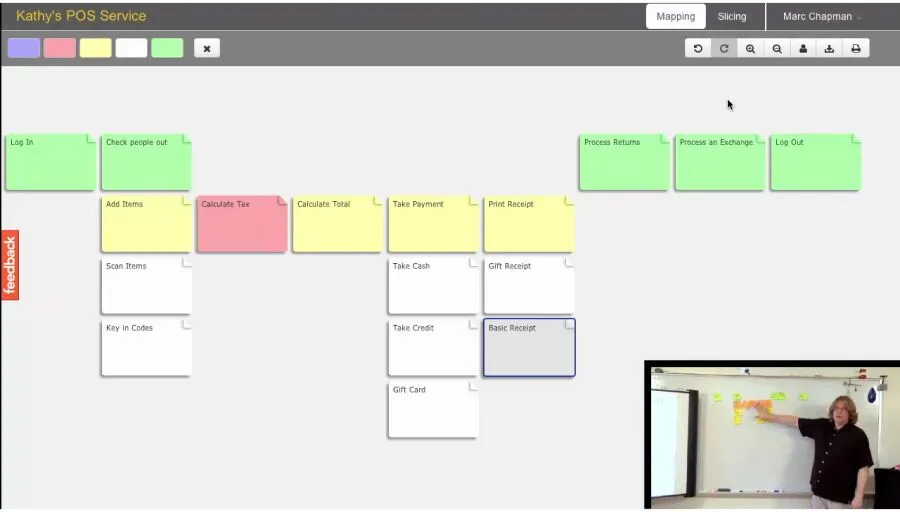
CardBoard is the original user story mapping tool — built in 2012 by DevJam founder David Hussman alongside Jeff Patton, who wrote the book on the practice. A user story map arranges work along the customer's journey toward an outcome, not by status like a kanban board: cards snap to a grid along the journey, parent cards hold the detail beneath them, dividers mark release slices, and slices (or named cards) define the outcomes the work is for. CardBoard holds that structure as real data — so cards sync two-way with Jira and Azure DevOps, the map stays current after the workshop, and the AI agents working with your team can read it.
The original user story mapping tool.
DevJam founder David Hussman built CardBoard in 2012 to put story maps on a screen. His friend Jeff Patton wrote the book that named the practice — and the two had been developing story mapping together since around 2009. An early CardBoard map, facilitated by Hussman, appears in Patton's User Story Mapping (p.117). Every story-mapping tool that came after is working from the method these two defined.
More on the lineage in the CardBoard story.
Story mapping exists to build shared understanding.
A backlog tells you what's left to do. A map tells the whole team the same story about why — so designers, engineers, BAs, and stakeholders reason from one picture instead of their own private read of a doc. Everyone works the same map.
A story map points at the user. A kanban board points at status.
Most trackers and task lists run left to right by status — to do, doing, done. That's what a backlog cares about. A story map runs left to right along the customer's journey: the sequence of things a person does to reach an outcome, with the detail decomposed top to bottom. The horizontal axis carries meaning a status column can't — this is the experience you're building, in order. That's why a story map shows the point, not just the pile.
The structure does the talking, so you write less.
CardBoard's structure isn't decoration — it's data. Everything is a card on a grid, so position is meaningful instead of approximate: across the grid runs the user's journey, and a parent card holds the detail beneath it. Drop a divider and you've cut a release slice. A slice can define an outcome, or you can name an outcome card directly — so the map always shows what the work is for, not just what's left.
You don't write sentences to explain how the pieces relate; their position says it. That's the efficiency of a spatial grammar — the arrangement carries the idea in far fewer words than a document would need. It's Patton's own point: a spec isn't shared understanding; arrangement and pictures convey what prose can't.
Type lives where it belongs. Connect a tracker and each card carries its real type from your system of record. Before you integrate, teams just color-code the cards and the map reads at a glance.
And because the structure is declared — grid, parent cards, slices, outcomes — your agent reads it as meaning, not a picture to guess at. A freeform canvas hands an AI a screenshot to infer from; CardBoard hands it the actual shape of the work. As AI takes on more of the execution, the structured map is what keeps human and agent on the same intent.
Intent survives the commit.
The reasoning lives on the card.
Open a card and it holds its own description, its definition of done, and the discussion about it. Flag a card with a reaction when it needs follow-up. The thinking stays attached to the work — not lost in a doc or a Slack thread you can't find next month. The map doesn't just hold what to build; it holds why, where the work is.
The map and the backlog never drift apart.
Connect Jira or Azure DevOps and cards sync two-way: a card's title, description, and status update in both directions, and each card carries its real type from the tracker — epic, feature, story, task. What doesn't sync is where you put cards — position stays yours, so the board is still a place to think, not a backlog you're afraid to disturb. The plan you mapped in the workshop is still true a month later.
Teams that map in CardBoard.
CardBoard is way easier to use than Miro. I recommend it whenever we discuss planning tools — I've used it for years at a Fortune 100 insurance company.
The 'backbone' lets us drill into specifics without losing the big picture. My teams love working in CardBoard.
Most tools don't offer story mapping, which is a critical exercise in agile backlog grooming. CardBoard fills that gap.
Map your product's story in CardBoard.
Start free — no credit card. Guests are free. Connect Jira or Azure DevOps when you want.
Frequently asked questions
- What is user story mapping?
- User story mapping is a planning practice that arranges work along the user's journey instead of in a flat backlog: the steps a user takes run across the top, the detail sits beneath each one, and horizontal slices group the work into releases. It keeps the team focused on the outcome, not just the pile of tickets.
- Who created user story mapping and CardBoard?
- Story mapping was developed by Jeff Patton and David Hussman, who began exploring the ideas together around 2009. Patton wrote the book User Story Mapping; Hussman, founder of DevJam, built CardBoard in 2012 — the first tool made for the practice.
- How is a story map different from a kanban board?
- A kanban board runs left to right by status (to do, doing, done) — useful for tracking work in progress. A story map runs left to right along the customer's journey toward an outcome, with detail decomposed top to bottom. The story map's axis carries meaning about the user experience that a status column doesn't.
- Is CardBoard a free user story mapping tool?
- Yes. CardBoard has a free plan, and guests are always free. Paid plans add capacity as your team grows.
- Does it integrate with Jira and Azure DevOps?
- Yes — two-way. A card's title, description, and status sync in both directions, and each card carries its type from the tracker, so the map and the backlog never drift apart.
- Can AI agents work in the map?
- Yes. Because the structure is declared — grid, parent cards, slices, outcomes — an agent reads the shape of the work directly and can act inside the map instead of guessing from a screenshot.
- How is it different from a whiteboard like Miro?
- A general whiteboard is sticky notes on an infinite canvas. CardBoard is purpose-built for story mapping — the grid, slices, and outcomes are real structure, and the map syncs to your backlog, so it stays useful after the workshop.Full comparison →
New to the practice? Start with the complete user story mapping guide. Weighing your options? See how the best user story mapping tools compare.
Map your product's story in CardBoard.
Start free — no credit card. Guests are free. Connect Jira or Azure DevOps when you want.